

Both Nx and Turborepo seem to cover very similar ground. They provide task scheduling, caching (local and remote), and affected detection. The differences emerge as your needs grow. While Turbo covers just the basics, Nx provides solutions along the entire software growth lifecycle, even when you need more advanced features such as distributed CI, polyglot builds, or AI-powered CI workflows. That's where the gap widens.
This doesn't come at the cost of adoption complexity though. Nx is designed to be modular from the ground up and can be adopted incrementally as you need more.
This page starts with the basics, like onboarding, and progressively moves into more advanced capabilities.
| Topic | Nx | Turborepo |
|---|---|---|
| Onboarding | Zero-config or guided nx init (+3 lines) | Manual turbo.json (+144 lines) |
| Running tasks | Runs package.json scripts, optional plugin-based task inference | Runs package.json scripts, requires turbo.json config |
| Caching | Explicit opt-in, composable namedInputs | Cached by default, flat input lists |
| Task sandboxing | IO tracing + cache poisoning protection | Not available |
| Code generation | Programmatic generators with AST transforms and graph awareness | Template-based file scaffolding (Plop) |
| Module boundary rules | Tag-based lint rule + conformance rules (polyglot) | Experimental turbo boundaries (since 2024) |
| Polyglot support | Native support for JS/TS, Java, .NET, Python, Rust | Any CLI via package.json scripts, no native graph |
| AI integration | Agent skills, MCP, configure-ai-agents, self-healing CI | Official skill, no MCP or CI integration |
| CI solution | Nx Cloud: distribution (9m 20s), self-healing, flaky detection | No CI solution (19m 18s with manual binning) |
| Cross-repo coordination | Polygraph (synthetic monorepo) | Not available |
| Release management | Built-in versioning, changelogs, and publishing | Requires manual setup or 3rd party tools |
| Observability | Integrated dashboards and AI-powered run analysis | Experimental OpenTelemetry (OTLP) export |
| Developer experience | TUI, IDE extensions, and interactive project graph | Basic TUI and LSP support |
Onboarding
Section titled “Onboarding”Nx works with your existing package.json scripts out of the box. Add the nx package to your workspace and you immediately get task orchestration, affected detection, and local caching, without writing any task configuration.
Turborepo requires every task to be explicitly declared in turbo.json before anything runs, even if the same tasks already work with your package manager directly:
• turbo 2.8.7 × Missing tasks in project ╰─▶ × Could not find task `build` in projectFor a more guided experience, run npx nx init. The interactive setup detects your existing tooling, asks which tasks should be cacheable, and scaffolds an nx.json with the right configuration. If you have Next.js and ESLint, for example, Nx automatically infers build, dev, start, and lint targets without you declaring them.
Looking at the raw impact on a repository using the same pnpm workspace migrated with both tools:
| Setup | Config written | Net impact on codebase |
|---|---|---|
| Nx (minimal) | 3 lines | +3 lines |
| Nx (guided) | 85 lines | -15 lines |
| Turborepo | 122 lines (manual) | +144 lines |
For a full walkthrough, see Adding Nx to your Existing Project. If you're coming from Turborepo, see Migrating from Turborepo to Nx.
Running tasks
Section titled “Running tasks”Once installed, both tools run your existing package.json scripts. If your project has a build script, nx build runs it, just like turbo run build. No rewiring needed.
nx run-many -t build test lintNx also provides nx affected to run only tasks affected by your current changes, which works immediately without configuration.
Where Nx goes further is with plugins. Adding an Nx plugin like @nx/vite automatically infers tasks from your existing tool configuration (e.g. vite.config.mts), so you don't need to maintain manual script definitions. Plugins also read your tool's config to set cache inputs and outputs automatically, meaning caching works correctly from the start without manual tuning.
Caching
Section titled “Caching”Both tools cache task results, but the defaults and depth of caching support differ significantly. Better cache configuration means fewer false positives, fewer unnecessary re-runs, and faster CI.
Turborepo caches every task by default, so you opt out of caching with cache: false on tasks like dev. Nx does the opposite: nothing is cached unless you explicitly set cache: true. This is a more cautious opt-in model, since not all tasks are cacheable by default.
Nx also provides namedInputs, reusable input patterns that you can compose across targets. You define a pattern once (like "production sources") and reference it everywhere. Turborepo's inputs are flat lists with no composition, so every target repeats the same exclusions.
Here's the same workspace configured with both tools:
{ "namedInputs": { "default": ["{projectRoot}/**/*", "sharedGlobals"], "sharedGlobals": ["{workspaceRoot}/.github/workflows/ci.yml"], "production": [ "default", "!{projectRoot}/**/?(*.)+(spec|test).[jt]s?(x)?(.snap)", "!{projectRoot}/tsconfig.spec.json", "!{projectRoot}/vitest.config.[jt]s", "!{projectRoot}/jest.config.[jt]s" ] }, "targetDefaults": { "build": { "dependsOn": ["^build"], "inputs": ["production", "^production"], "outputs": ["{projectRoot}/dist"], "cache": true, "configurations": { "prod": {} } }, "check-types": { "dependsOn": ["^check-types"], "inputs": ["production", "^production"], "cache": true }, "test": { "inputs": ["default", "^production"], "outputs": ["{projectRoot}/coverage"], "cache": true }, "lint": { "inputs": ["default", "{workspaceRoot}/eslint.config.mjs"], "cache": true }, "dev": { "continuous": true }, "@org/shop-e2e:test:e2e": { "dependsOn": ["@org/shop:build"] }, "@org/admin-e2e:test:e2e": { "dependsOn": ["@org/admin:build"] } }}{ "tasks": { "build": { "outputs": ["dist/**"], "dependsOn": ["^build"], "inputs": [ "$TURBO_DEFAULT$", "!eslint.config.mjs", "!**/*.spec.ts", "!**/*.test.ts", "!**/*.spec.tsx", "!**/*.test.tsx", "!**/*.spec.js", "!**/*.test.js", "!**/*.spec.jsx", "!**/*.test.jsx", "!tsconfig.spec.json", "!vitest.config.ts", "!jest.config.js" ] }, "build:prod": { "outputs": ["dist/**"], "dependsOn": ["^build"], "inputs": [ "$TURBO_DEFAULT$", "!eslint.config.mjs", "!**/*.spec.ts", "!**/*.test.ts", "!**/*.spec.tsx", "!**/*.test.tsx", "!**/*.spec.js", "!**/*.test.js", "!**/*.spec.jsx", "!**/*.test.jsx", "!tsconfig.spec.json", "!vitest.config.ts", "!jest.config.js" ] }, "check-types": { "dependsOn": ["^check-types"], "inputs": [ "$TURBO_DEFAULT$", "!eslint.config.mjs", "!**/*.spec.ts", "!**/*.test.ts", "!**/*.spec.tsx", "!**/*.test.tsx", "!**/*.spec.js", "!**/*.test.js", "!**/*.spec.jsx", "!**/*.test.jsx", "!tsconfig.spec.json", "!vitest.config.ts", "!jest.config.js" ] }, "test": {}, "lint": {}, "dev": { "persistent": true, "cache": false }, "@org/shop-e2e#test:e2e": { "dependsOn": ["@org/shop#build"] }, "@org/admin-e2e#test:e2e": { "dependsOn": ["@org/admin#build"] } }}The production pattern in Nx is defined once and reused across build and test. A change to a spec file won't invalidate the build cache because production explicitly excludes test files.
In Turborepo, the same exclusion list is repeated across build, build:prod, and check-types. There's no way to define it once and reuse it.
Task sandboxing
Section titled “Task sandboxing”A cache is only valuable if you can trust it. Turborepo has no task sandboxing. During execution, tasks can read and write anywhere on the filesystem. A task can read files that aren't declared as inputs and produce undeclared outputs that get cached and replayed into a different context. The result: false cache hits, missing artifacts, and hard-to-trace failures.
Nx provides task sandboxing that monitors filesystem access during execution and flags any reads or writes outside declared inputs and outputs. Undeclared dependencies are surfaced automatically rather than discovered through debugging production incidents.
This matters for security too. CVE-2025-36852 (CREEP) demonstrated that build systems without cache isolation are vulnerable to cache poisoning, where any contributor with PR access can inject compromised artifacts into production. Nx Cloud prevents this through branch-scoped cache isolation. For more details, see cache security.
Task sandboxing is an architectural difference, not a configuration problem. There's no workaround on the Turborepo side.
Code generation
Section titled “Code generation”Both tools offer code generation, but the depth differs significantly.
Turborepo provides turbo gen, a thin wrapper around Plop.js. It can scaffold new workspaces and create files from Handlebars templates, but it's limited to template-based file creation and simple string append/prepend operations. There's no AST-level code modification, no awareness of the project graph, and no migration/codemod system.
Nx generators are built on top of Nx Devkit, a full programmatic API for workspace manipulation. Generators can read and modify the project graph, perform AST-level TypeScript transforms, and compose with other generators. You can create local workspace generators that encode your team's specific patterns.
The real value isn't raw scaffolding, AI can do that too. It's deterministic, convention-aware generation. AI agents can invoke your generators to produce code matching your patterns from the start. This is faster and more token-efficient than generating everything from scratch.
Module boundary rules
Section titled “Module boundary rules”In large workspaces, unchecked dependencies between projects lead to architectural drift. Both tools offer mechanisms to enforce boundaries, but with different maturity and scope.
Nx has provided module boundary rules since its earliest versions. You assign tags to projects and define which tags can depend on which, enforced as a lint rule. For polyglot workspaces where ESLint isn't available, Nx also offers conformance rules that work across any language.
This becomes especially important with AI coding agents. Boundary rules act as guardrails, preventing agents from creating arbitrary cross-project dependencies that violate your architecture.
Turborepo added experimental turbo boundaries in 2024, which can define allowed dependencies in turbo.json and visualize them in their devtools graph view.
Polyglot support
Section titled “Polyglot support”Nx provides first-party plugins for Maven, Gradle, .NET, and Docker, plus community plugins for Python (UV, Poetry), Rust (Cargo), Go, and PHP. Each plugin provides automatic dependency detection, target inference, caching, affected detection, and distribution.
Turborepo can orchestrate any language by wrapping CLI commands in package.json scripts. However, non-JS projects still require a package.json, and Turborepo provides no automatic dependency graph analysis or target inference for those languages. You must define everything manually.
This difference is critical for AI readiness. When your backend is in Go and your frontend is in Next.js, an AI agent with Nx can see the full cross-language dependency chain. With Turborepo, those services are "islands," and an agent has no way to reason about how a change in the Go API affects the frontend.
AI integration
Section titled “AI integration”Nx actively embraces AI and autonomous agents across the entire development lifecycle, not just individual features. Running nx configure-ai-agents sets up everything your AI agent needs in one command: agent skills, an MCP server, and CLAUDE.md / AGENTS.md guidelines. It works across Claude Code, Cursor, GitHub Copilot, Gemini, Codex, and OpenCode.
- Agent skills teach agents how to work in your monorepo: when to use generators, how to explore the project graph, how to run tasks efficiently. Skills are loaded incrementally, keeping context focused and token-efficient.
- Self-healing CI is a specialized AI agent that runs on CI, monitors runs, diagnoses broken tasks, provides verified fixes, and automatically identifies and re-runs flaky tasks.
- Dedicated skills and an MCP server allow the local coding agent to connect and coordinate with the remote CI agent, creating fully autonomous push-fix-verify loops.
- The Nx CLI is optimized for agentic use: commands like
nx init,nx import, andcreate-nx-workspacedetect when they're called by an agent and emit structured JSON output instead of interactive prompts, reducing wasted tokens and retries.
Turborepo provides an official skill covering task configuration and caching strategies, plus a turbo docs command. However, no CI integration for agents, and no AI powered self-healing CI system.
Running Nx vs Turbo on CI
Section titled “Running Nx vs Turbo on CI”Nx works on any CI provider out of the box. Run nx affected or nx run-many in your existing pipeline and you get caching, affected detection, and task orchestration without additional setup. For teams that need more, Nx Cloud layers on remote caching, intelligent task distribution across machines, self-healing CI, and flaky task detection, all integrated directly into your existing CI provider.
Turborepo has no CI-specific solution. It runs tasks on CI the same way it does locally, with no built-in distribution, failure recovery, or CI-aware features.
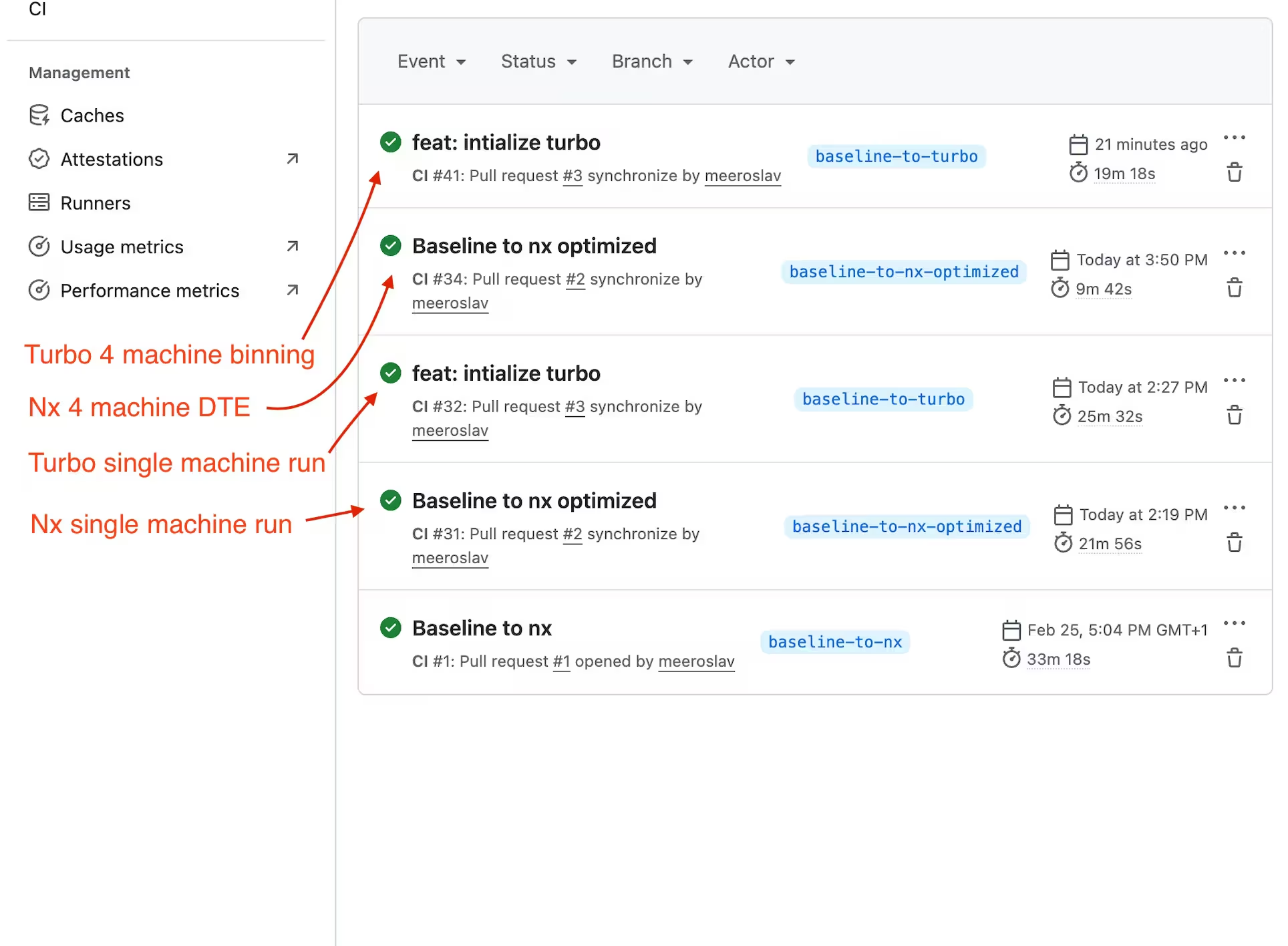
Single-machine CI performance
Section titled “Single-machine CI performance”On a single CI runner with no cache hits, Nx is measurably faster. Its Rust-powered task scheduler produces a more optimal execution order, and its file hashing and cache restoration are more efficient.

| Tool | Duration | Difference |
|---|---|---|
| Nx | 21m 56s | N/A |
| Turborepo | 25m 32s | ~16% slower |
A 16% gap may sound modest, but on a 30-minute pipeline that's nearly 4 minutes saved on every run. Note that these numbers are without any cache optimization, just both tools running out of the box on the same codebase.
Distributed CI
Section titled “Distributed CI”When a single machine is no longer enough, the tools diverge significantly.
On the same workspace distributed across 4 machines:
| Metric | Nx Agents | Turborepo (binning) |
|---|---|---|
| Total duration | 9m 20s | 19m 18s |
| Agent spread | 5m 1s - 9m 16s | 2m 50s - 18m 20s |
Nx Agents splits work across multiple CI machines at the individual task level, dynamically balancing load based on historical timing data. The scheduler keeps all agents busy with minimal idle time.
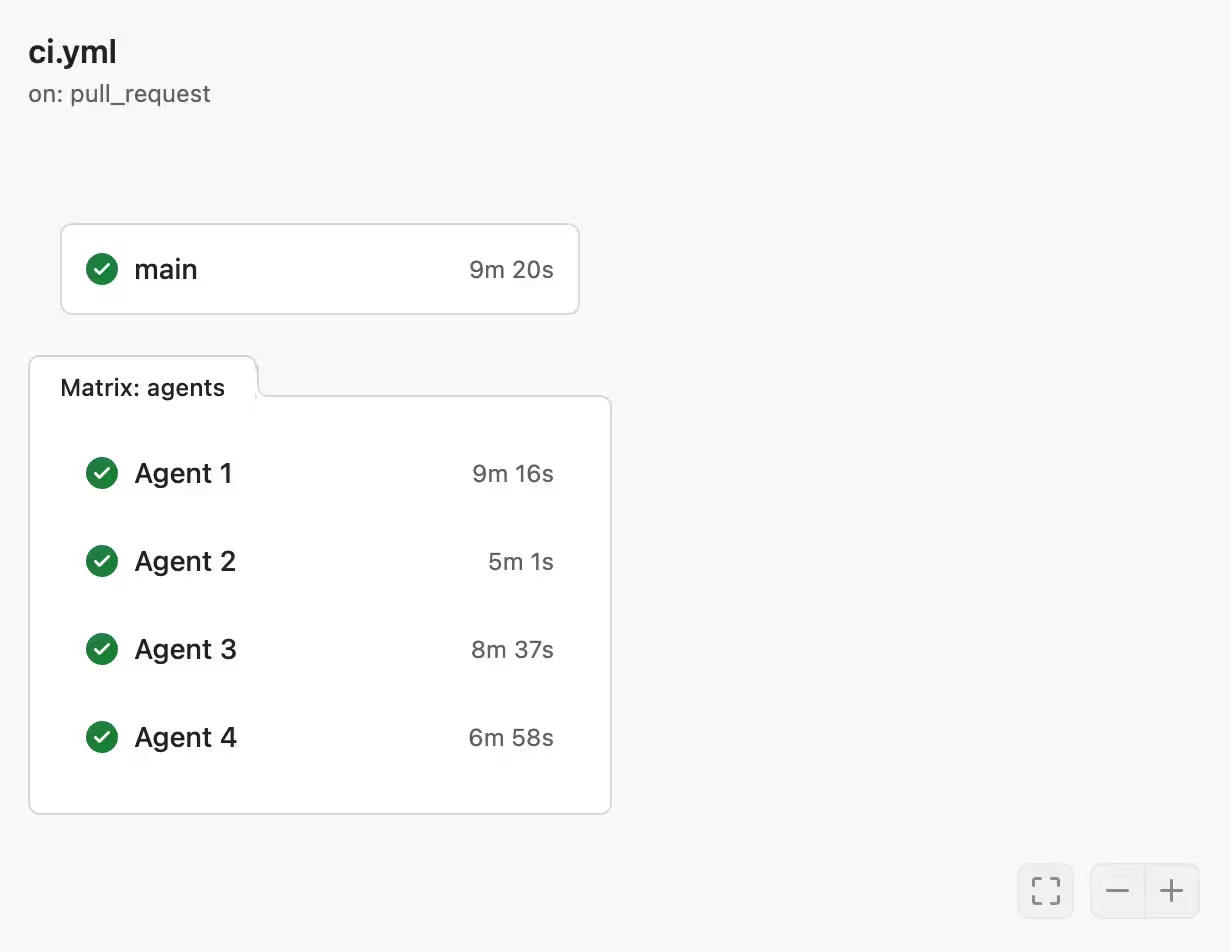
Turborepo has no built-in distribution. Scaling to multiple machines requires manual "binning," where you statically assign tasks to runners and rebalance by hand as the codebase evolves.
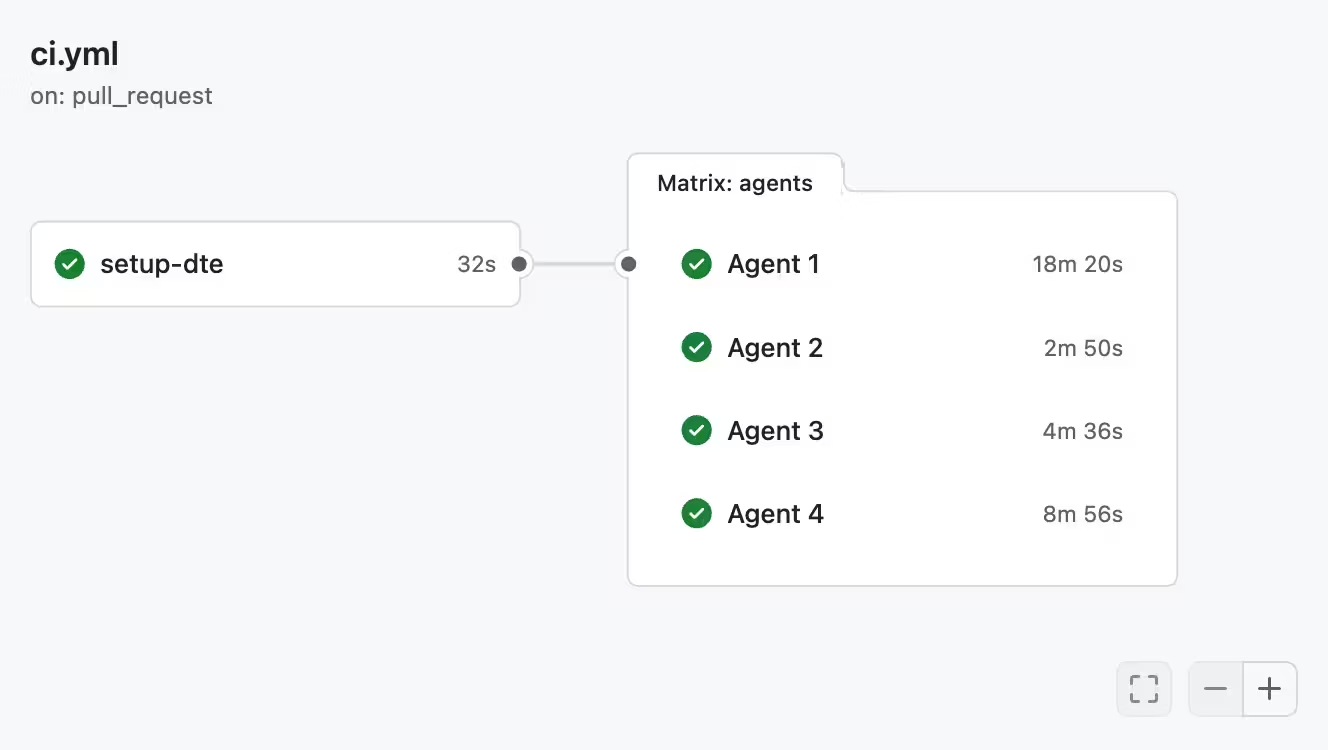
Turborepo is 2x slower even on this small sample. One Turborepo agent ran for 18 minutes while another sat idle after 3 minutes. The gap grows with more machines.
The core difference is declarative vs imperative:
- With Nx you declare what should run on CI, and Nx Cloud figures out the optimal distribution automatically. Nx Agents adapts automatically and gets smarter over time.
- With Turborepo, you imperatively assign tasks to machines and maintain that mapping as the codebase evolves.
To learn more about distribution on CI, read Distribute Task Execution (Nx Agents).
Nx also provides Atomizer, which automatically splits slow e2e and integration test suites into per-file tasks that can run in parallel across machines. For more information, see split e2e tasks.
CI throughput
Section titled “CI throughput”Raw CI speed is one part of throughput. The other is avoiding failed PRs. A failing PR means a developer has to stop, inspect logs, provide a fix, push again, and wait for another CI run. As AI agents ship more PRs, CI quickly becomes the bottleneck.
Nx Cloud's self-healing CI places a specialized AI agent on CI that analyzes failures, proposes fixes, and auto-applies verified fixes. This reduces friction on the developer side, allowing PRs to move forward without manual intervention.
Flaky task detection identifies flaky tests and re-runs them in isolation, preventing false failures from blocking your pipeline.
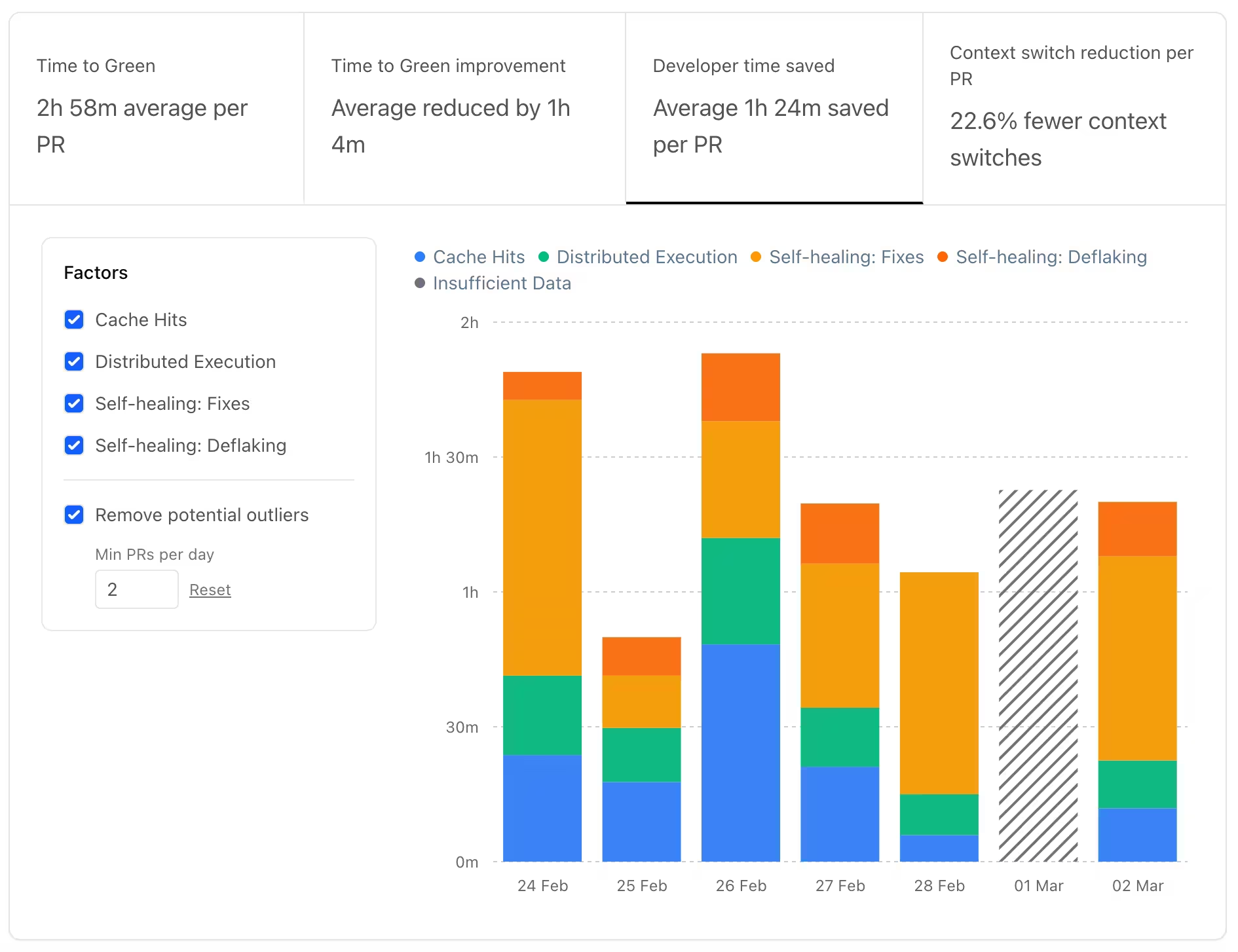
The metrics shown above are extracted directly from the Nx Cloud dashboard.
Turborepo offers neither. A flaky test fails the build, and every failure requires a full human round trip.
Observability
Section titled “Observability”Both tools offer visibility into your pipelines, but through different models.
Nx Cloud provides integrated dashboards out of the box. You get detailed run reports, timing data, cache hit/miss trends, and historical performance analysis without any external setup. These insights are also queryable via the MCP server, letting AI assistants analyze CI performance conversationally.
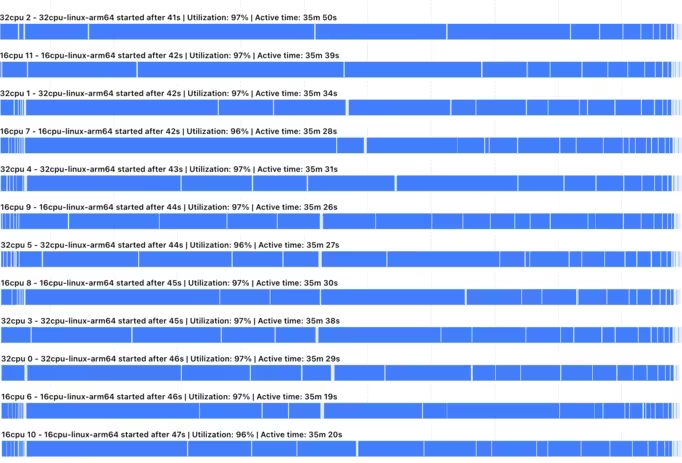
Nx Agent utilization chart, showing even distribution across CI runners.
For deep dives into resource utilization, see CI Resource Usage.
Turborepo exposes run metrics via experimental OpenTelemetry (OTLP). This is useful if you already have a mature observability stack (like Datadog or Grafana) and want to route build metrics into it, though it requires significant manual setup and maintenance of your own collector and visualization layer.
Cross-repo coordination
Section titled “Cross-repo coordination”Most organizations don't have a single monorepo. They have several monorepos plus standalone repos across teams.
Nx Cloud's Polygraph creates a synthetic monorepo: a unified dependency graph across separate repositories without moving any code. AI agents can read the cross-repo graph, coordinate changes across repos, and manage PRs across repo boundaries.
Turborepo has no cross-repo coordination.
Release management
Section titled “Release management”Versioning and publishing libraries in a monorepo is a complex orchestration task. You need to identify what changed, determine the next version for each package, update internal dependencies, generate changelogs, and publish to registries.
Nx provides a first-party, unified release system via nx release that automates the entire lifecycle of versioning, changelog generation, and publishing with a single, highly configurable command.
Turborepo has no built-in release solution. Teams usually end up manually configuring third-party tools like Changesets or Lerna, adding another layer of manual setup and tool maintenance to the workspace.
Developer experience
Section titled “Developer experience”Project graph
Section titled “Project graph”Both tools can visualize the dependency graph, but the implementations differ significantly at scale. Turborepo renders every node at once, which becomes unreadable past a few dozen projects. Nx provides an interactive graph that lets you filter, group, and search projects, then drill into any node for details on demand.
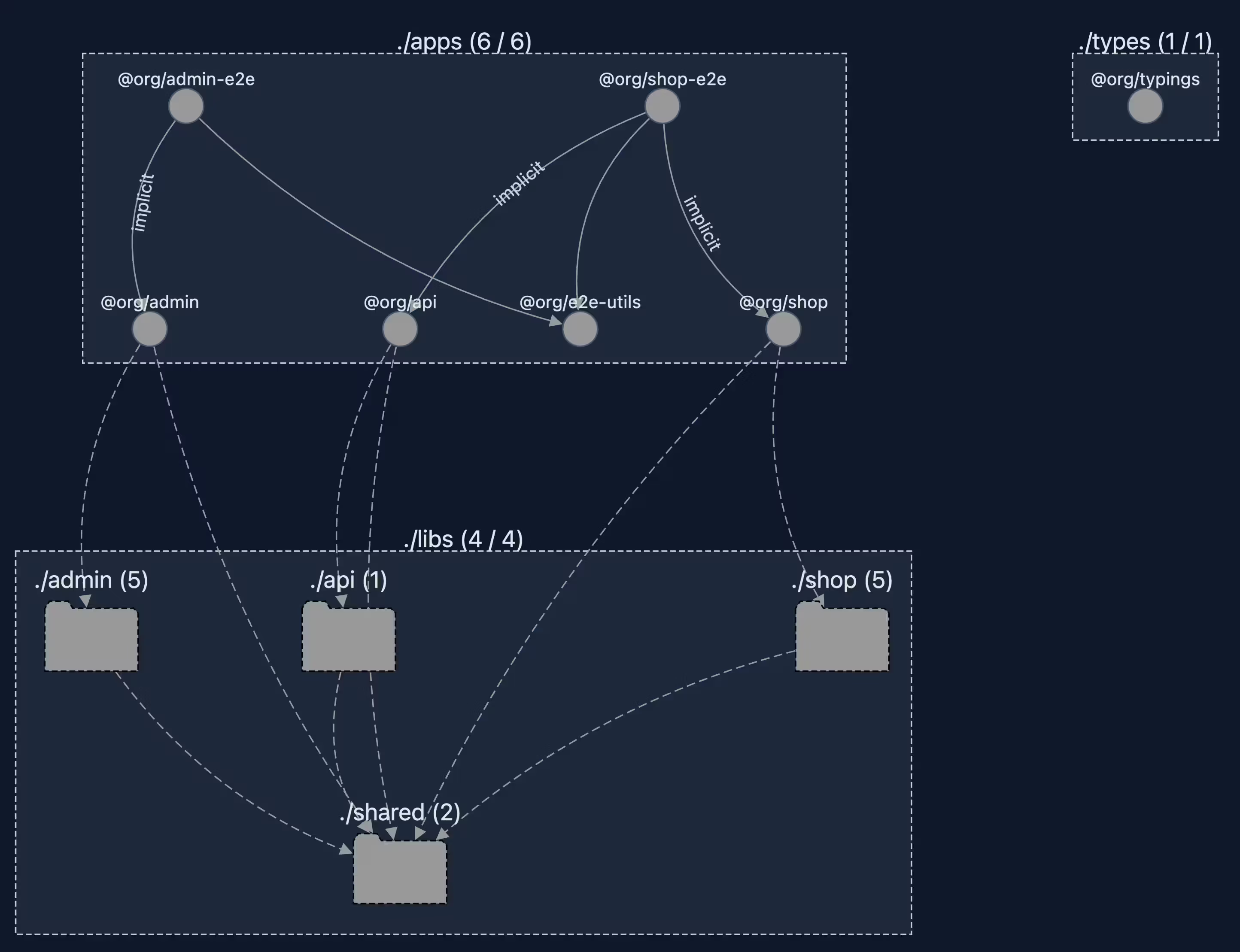
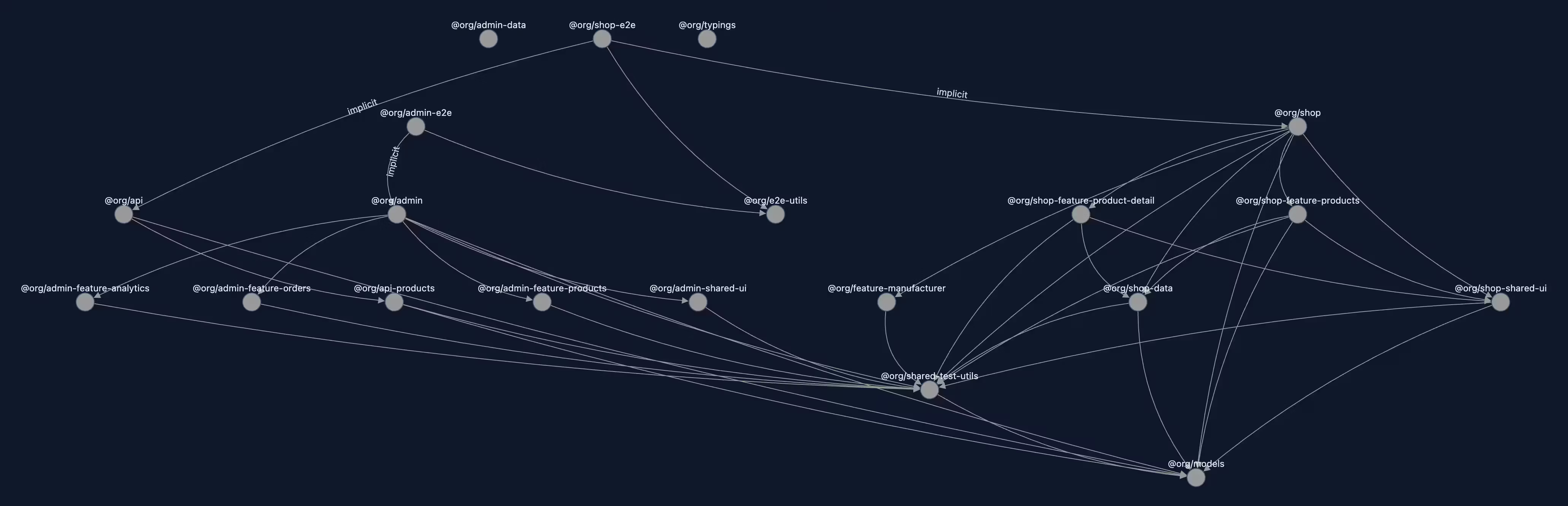
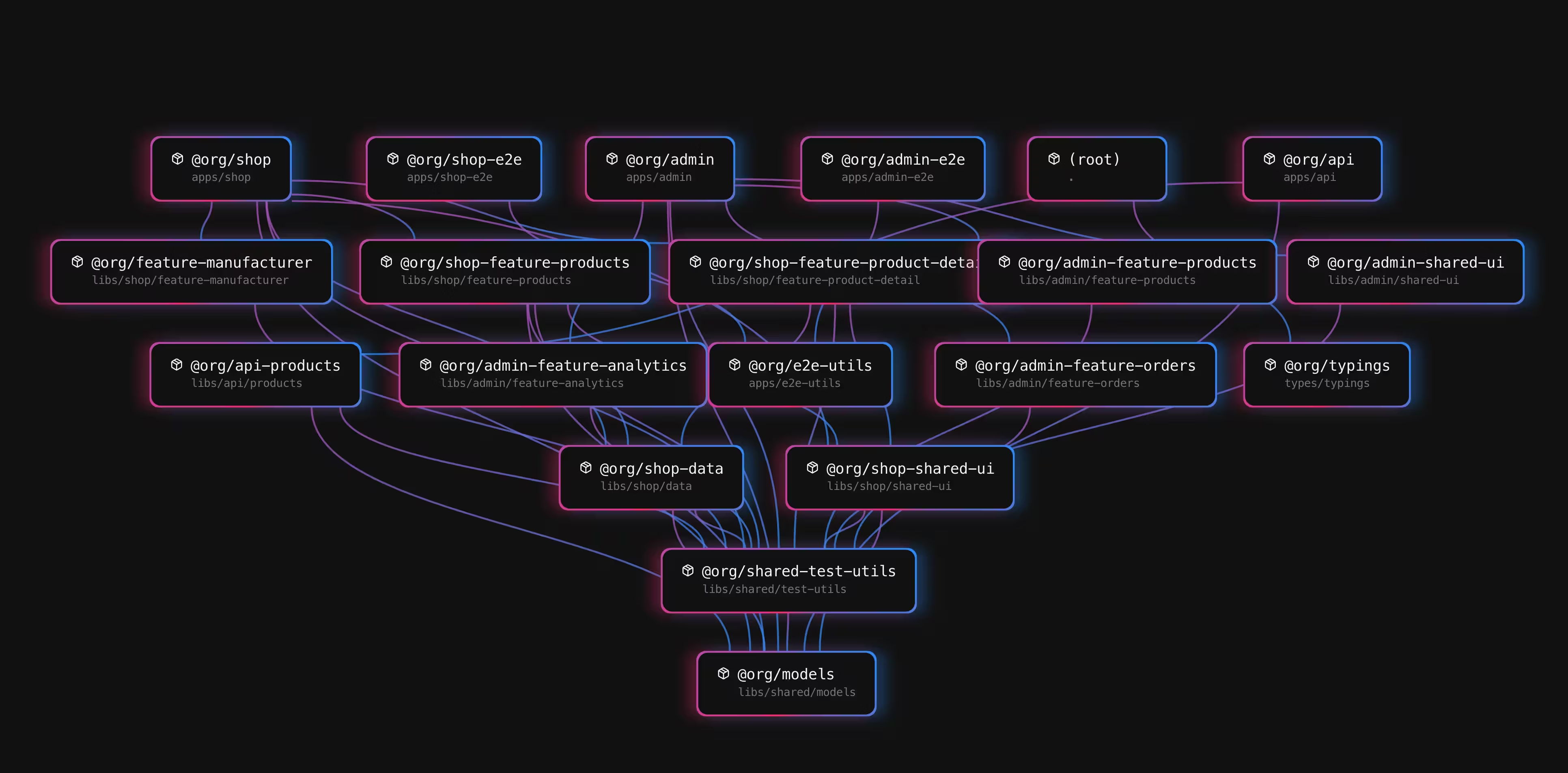
The Nx graph is also available inside Nx Console, so you can explore dependencies without leaving your editor.
Terminal UI
Section titled “Terminal UI”Nx ships with a full terminal UI that adapts to what you're running. For multi-task runs, it shows a task overview with filtering, pinning, and layout switching. For a single task with no dependencies, it drops into a simplified view with the output front and center. Colors, order, and indentation from your underlying tools are preserved.
Turborepo has a more simplified version of a TUI which shows task output in a split view. You can opt-in to that TUI experience.
IDE extensions
Section titled “IDE extensions”Nx Console provides extensions for VS Code and WebStorm/IntelliJ with close to 2 million installations. You can run tasks, explore the project graph, scaffold with generators, and inspect Nx Cloud CI runs directly from your editor. It also includes a language server that provides autocompletion in nx.json and project.json files.
Turborepo provides basic LSP support for turbo.json.